YouTube automation for the edit, with the judgment left to you
YouTube automation means different things to different people, so here is the plain version. JetMotion automates the production of a video: footage, edit, captions, Shorts, titles, description and tags, delivered on days you pick. It does not automate the script, the choice of topic or the decisions that make a channel worth watching.
 The side of the ship is gone00:00:00 · Photo, slow pushNASA AS13-59-8562 · Public domain
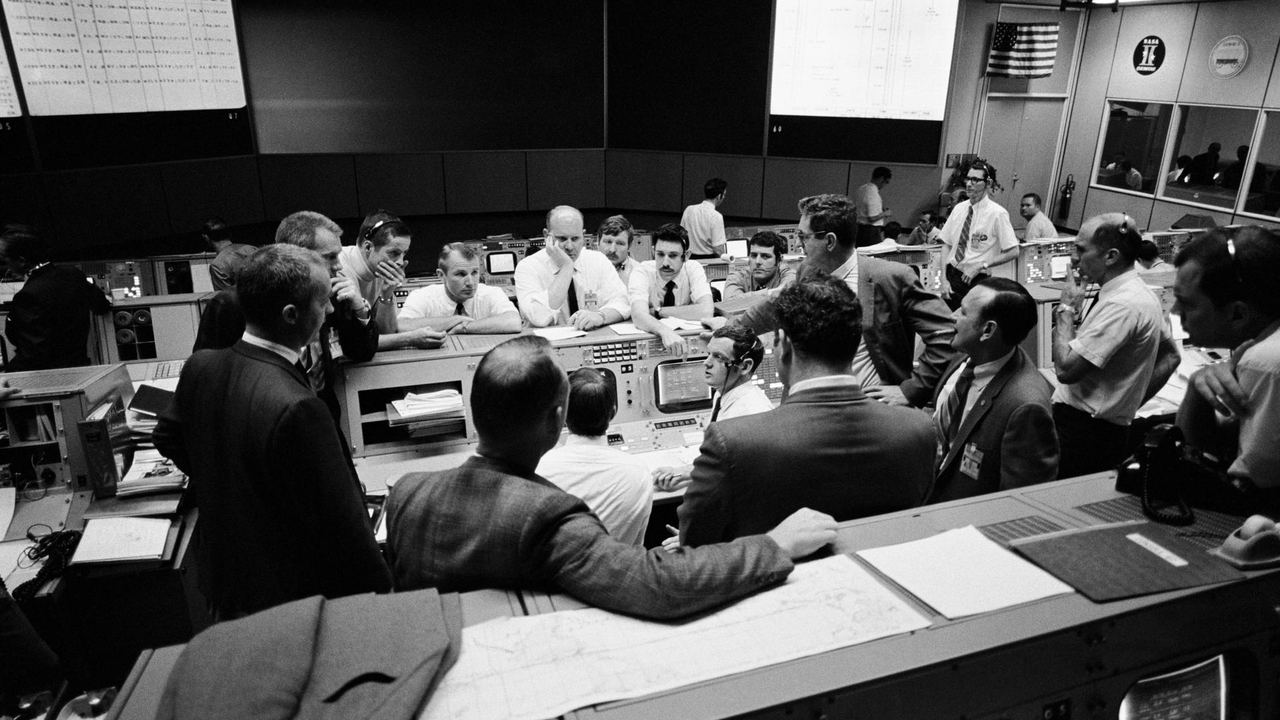
 Houston, 55 hours in00:00:06 · Photo, pan leftNASA S70-35368 · Public domain
 200,000 miles from home00:00:13 · Photo + distance counterNASA AS13-60-8588 · Public domain
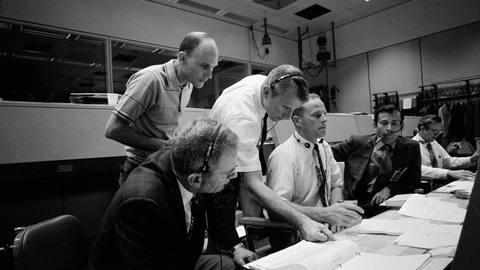 Three men, one lifeboat00:00:19 · Photo + name cardsNASA S70-34902 · Public domain
 Around the far side00:00:26 · Photo + route mapNASA AS13-60-8703 · Public domain
What YouTube automation can do today
The repeatable parts of making a video can be automated well. Finding footage for each line, cutting to a pacing rule, adding captions, drawing a map, writing chapters and tags: these are tasks with clear rules, and a tool can follow rules every time without getting tired at minute eleven. This is where YouTube automation software earns its price, because these tasks are also the ones that eat an editor's week.
- Footage selection from licensed stock and public-domain archives
- The edit, cut to each template's pacing rules
- Captions and motion graphics
- Shorts cut from each long video
- Title options, description with chapters, tags and a pinned comment
What automation cannot do for a channel
No tool knows why your audience clicked on the last video, which topic they are tired of, or which claim in a script is wrong. Those calls belong to the person running the channel. JetMotion works from your script for that reason. You choose the subject, write or commission the words, check the facts, review the shot plan and pick the title. The tool handles what follows from those choices.
There is also a policy reason to stay involved. YouTube can refuse monetization to channels it considers reused or inauthentic, including content that is mass-produced from a template with little variation. A channel run entirely on autopilot is the kind most at risk. JetMotion videos are built to meet YouTube's original-content rules, but the originality starts with your script, and YouTube makes the final call.
Scheduled delivery and the render queue
On Studio and Pro you can set scheduled delivery: pick the days, and finished videos arrive on them. Submit scripts in a batch at the start of the week and the videos come back on your upload days. The render queue is ordered by plan. Starter uses the standard queue, Studio has priority, and Pro goes first. The first video on any plan renders straight away, and a 15-minute video usually finishes in under an hour.
Uploading from the dashboard
Studio and Pro let you upload a finished video to YouTube from the JetMotion dashboard, so the file does not have to travel through your laptop first. The title options, description, tags and pinned comment are produced with the video. On Starter, you download the package and upload it through YouTube Studio yourself. Either way, look at the video before it goes public. A two-minute check of the opening and the name cards is cheap insurance.
A weekly routine for faceless YouTube automation
Here is what a two-video week can look like on Studio. Monday: write or edit two 12-minute scripts and submit them. Review both shot plans the same day and swap the shots that miss. Wednesday and Saturday: the videos arrive by scheduled delivery, you watch them, choose a title and upload from the dashboard. That is 24 credits a week, about 100 a month, out of 360. Your hours go on scripts and decisions, which is the work that separates one channel from another.
What JetMotion does not automate
It is better to know the gaps now. API and MCP access are offered on request, not inside the plans, so wiring JetMotion into your own pipeline starts with contacting us. As of November 2026, GoMotion AI and Cliptude both offer self-serve API and MCP access, which matters if you want to start today without a conversation. JetMotion writes scripts only on Studio and Pro, does not make thumbnails beyond the brief, and does not reply to comments or read your analytics.
From script to upload in three steps
Batch your scripts
Write the week's scripts yourself and submit them together. Pick a template for each and set the delivery days on Studio or Pro.
Approve each shot plan
Review the plan for every video and swap shots where needed. This is the one manual checkpoint, and it is worth keeping.
Receive videos on schedule and upload
Finished videos arrive on the days you picked. Watch them, choose a title, and upload to YouTube from the dashboard.
One credit. One finished minute
Shorts, AI thumbnail and metadata are included on every plan.
Yearly saves 15% and adds a bonus month of credits on day one
Free
Try it before you pay
- Long videos up to 5 minutes, from your own script
- 1 free animated Short, plus 1 bonus Short from your video
- A natural HD voice and the documentary template
- Made at full speed, first in the queue
- Gameplay uploads up to 10 minutes
- 1 channel analysis and 1 open niche from the library
- Edit your video for 5 hours, with 1 free re-render
- One free start per person
Starter
One channel, one proven format
- Long videos up to 8 minutes, from your own script
- Case-footage videos (bodycam, interrogation, court) from ready cases
- 5 free standalone Shorts a month, 1 bonus Short from every long video
- 6 standard voices plus 10 HD voice minutes
- 30 fast minutes a month, then free scheduled delivery
- Niche library: 10+ researched niches with proof channels
- 3 channel analyses a month: niche, audience and what works
- Save every video to your Google Drive
- Title, description, tags and an AI thumbnail (standard image model)
- Edit documentaries for 5 hours after they are ready: 7 free re-renders a month
Studio
For channels publishing every day or two
- Long videos up to 15 minutes
- Script written for you from a topic
- 10 free standalone Shorts a month, 3 bonus Shorts from every long video
- More English voices, 18 more languages in natural HD voices at the standard price, 120 HD minutes, ElevenLabs voices
- 150 fast minutes a month and a priority queue
- 25-day planner from your channel link: up to 12 videos planned and made for you
- 8 channel analyses a month: niche, audience and what works
- 1 free channel kit a month (names, logo, banner, tags); in-depth kits 12 credits
- AI thumbnail with our best image model
- Niche library: 20+ niches, full channel data and CSV export
- Schedule straight to YouTube (coming soon)
- Save every video to your Google Drive
- Edit documentaries for 12 hours after they are ready: 12 free re-renders a month
Pro
For operators running several channels
- Long videos up to 25 minutes
- Script written for you from a topic
- 15 free standalone Shorts a month, 3 bonus Shorts from every long video
- Every voice and language, 300 HD minutes
- ElevenLabs with emotion, or your own key at 1 credit a minute
- Always fast, first in the queue
- 25-day planner: up to 30 videos
- Daily Autopilot: tracks your channel and competitors and makes each upload from what takes off
- 15 channel analyses a month
- 2 free channel kits a month; in-depth kits 8 credits
- AI thumbnail with our best image model
- Niche library: unlimited, every niche with revenue estimates and CSV export
- YouTube autopilot: made, uploaded and scheduled for you (coming soon)
- Save every video to your Google Drive
- Edit documentaries for 24 hours after they are ready: 20 free re-renders a month
Your first video renders straight away on every plan. Refer a creator and earn 15% of what they pay, as credits. Need API or MCP access, or more volume? Talk to us
Questions people ask
Is YouTube automation allowed by YouTube?
Using software to edit and package videos is normal and allowed. What YouTube's monetization policies object to is the output: reused content and inauthentic, mass-produced content can be refused monetization. A channel with original scripts and real editorial choices is in a different position from one that uploads near-identical videos in bulk. YouTube decides case by case.
Can JetMotion run a channel with no input from me?
No, and it is not designed to. It needs a script or a voiceover from you for every video, and it shows you a shot plan to approve before rendering. The topic, the writing, the fact checking and the final decision to publish stay with you.
Which plans include scheduled delivery and dashboard upload?
Studio and Pro. Studio is $59 a month and Pro is $119 a month, or $50.15 and $101.15 on yearly billing. Starter does not include scheduled delivery or upload from the dashboard. Starter videos go through the standard queue and you upload them yourself.
Is there an API for YouTube automation tools and agents?
Yes, on request. API and MCP access sit outside the standard plans, so contact us and describe what you are building. If self-serve API access is a hard requirement today, some competing long-form tools already offer it, and you should weigh that against the footage and editing differences.
How many videos can I produce a month?
It depends on length, since one credit is one finished minute. Starter's 120 credits cover fifteen 8-minute videos. Studio's 360 cover 24 videos of 15 minutes. Pro's 900 cover 36 videos at the full 25 minutes, or 60 at 15 minutes. Extra standalone Shorts cost 1 credit each from your own script, or 1.5 from just a title.
Does automation guarantee a monetized channel?
No. The YouTube Partner Programme needs 1,000 subscribers and 4,000 public watch hours in 12 months, or 10 million Shorts views in 90 days, and YouTube reviews each channel. A tool can lower the cost and time of each video. It cannot make people watch, and it cannot make YouTube's decision.
Related
Your next video is one idea away
Sign up and get 5 free credits and 1 free Short. No card needed, and your first video starts straight away.